 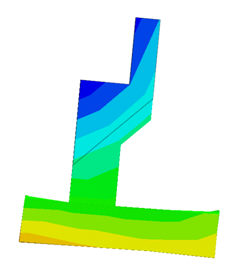
<Undeformed
shape> <Deformed
shape>
 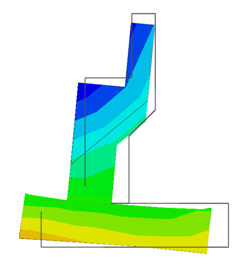
<Deformed
+ Undeformed (Wire)> <Deformed
+ Undeformed (Feature)>
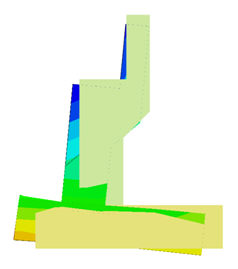
<Deform
+ Undeformed (Shading)>
Undeformed
The deformed shape is not
drawn. In other words, the original shape before
deformation is graphically expressed.
Deformed
Output the deformed shape.
Deformed
+ Undeformed (Wire)
Output both the deformed
shape and un-deformed shape (as a Wire).
Deformed
+ Undeformed (Feature)
Output both the deformed
shape and un-deformed shape (as a Feature boundary
line).
Deformed
+ Undeformed (Shading)
Output both the deformed
shape and un-deformed shape (using the geometry
shape colors).
Deformed
+ Undeformed (Transparent)
Output both the deformed
shape and un-deformed shape (using the geometry
shape colors under the transparency condition).
Deform
Properties
Specify the detailed properties
for graphic processing of deformed shapes.
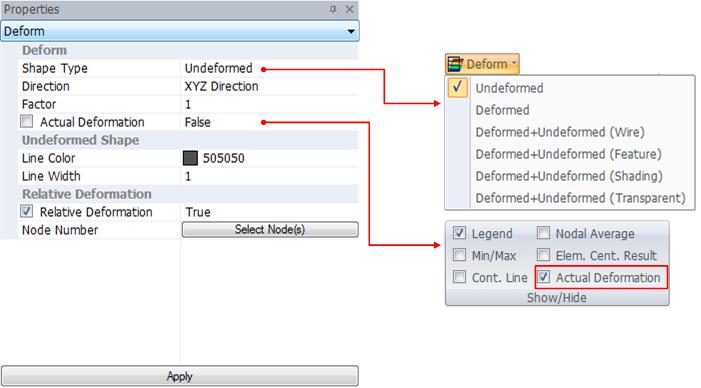
Deform
Graphically display
the results with reference to the selected deformed
shape.
Input the scale value
used when displaying the deformed shape on the
screen.
Checked: Express
the actual deformation.
UnChecked: The program
scales the displacement using an arbitrary scale
to easily determine the deformed shape (Scale
the maximum displacement to 1/20 size of the entire
model).
Undeformed
shape
Specify the method used
to display both the deformed shape and un-deformed
shape simultaneously on the screen. It is used
when applying Deformed + Undeformed (Wire) or
Deformed + Undeformed (Feature).
Specify the color
of the line used to display the un-deformed shape.
Specify the thickness
of the line used to express the un-deformed shape.
Relative
Deformation
Express the node
selected from the node number as a relative deformation.
Select the reference
point of the relative deformation. |


 Determine the
graphic processing of graphically represented results,
with reference to the selected deformed shape.
Determine the
graphic processing of graphically represented results,
with reference to the selected deformed shape. 


